3D Sub-tomogram Averaging Workflow
A comprehensive guide to running automated sub-tomogram averaging with py2rely and Relion 5.0.
Overview
The 3D sub-tomogram averaging (STA) workflow in py2rely automates the entire process from particle extraction to high-resolution reconstruction. The pipeline handles:
- ✅ Pseudo sub-tomogram extraction
- ✅ Initial model generation (de novo or from template)
- ✅ 3D classification (optional)
- ✅ CTF refinement and Bayesian polishing
- ✅ Post-processing and resolution estimation
This page describes how to run the STA pipeline on a local workstation or server, where jobs are executed directly on the available CPU/GPU resources. If you are running on a SLURM-based HPC system, see: 👉 Running STA Pipelines on HPC
Workflow Steps
1. 📦 Data Preparation
Refer to the Import Guide for generating the aligned_tilt_series.star and full_picks.star file.
2. ⚙️ Generate Pipeline Parameters
Create a parameter JSON file with default settings:
py2rely prepare relion5-parameters \
    -p input/24jan01_virus_like_particle.star \
    -ts input/tiltSeries/aligned_tilt_series.star \
    -ps 1.54 -lp 50 -pd 290 -bs 1.75 \
    -s C1 -bl 4,2,1
What this command does:
This generates a comprehensive JSON file containing all RELION job parameters for the entire pipeline. Think of it as a "recipe" that defines:
- Box sizes at each binning level
- Refinement parameters (angular sampling, offset search)
- CTF refinement settings
- Post-processing options
- Job dependencies and execution order
Knowing the box sizes per bin
✅ After the parameters JSON file is complete, we will see an output such as this:
[Initialize] Running Refinement Pipeline with Given Binnings and Resulting Box Sizes
[Initialize] Box Size: 84 @ bin=4
[Initialize] Box Size: 168 @ bin=2
[Initialize] Box Size: 352 @ bin=1
This will be necessary information when generating a template for the STA pipeline.
📋 py2rely prepare relion5-parameters
| Parameter | Short | Description | Default |
|---|---|---|---|
--output |
-o |
Output path for parameter JSON file | sta_parameters.json |
--tilt-series |
-ts |
Path to tilt series STAR file | input/tiltSeries/aligned_tilt_series.star |
--particles |
-p |
Path to particles STAR file | input/full_picks.star |
--tilt-series-pixel-size |
-ps |
Tilt series pixel size (Å) | 1.54 |
--symmetry |
-s |
Particle symmetry (C1, C2, D2, etc.) | C1 |
--low-pass |
-lp |
Low-pass filter for reference template (Å) | 50 |
--protein-diameter |
-pd |
Particle diameter (Å) | 290 |
--denovo-generation |
-dg |
Enable de novo model generation | False |
--box-scaling |
-bs |
Box size padding factor | 2.0 |
--binning-list |
-bl |
Binning factors (comma-separated) | 4,2,1 |
--nthreads |
-nj |
Number of threads for the pipeline | 8 |
--nprocesses |
-np |
Number of processes (required if not using SLURM) | None |
Compute behavior
-
If
--nprocessesis not specified,py2relywill automatically use the maximum number of available processes. -
If running through a scheduler (e.g., SLURM), this flag can safely be omitted.
-
If running on a personal workstation or server, we recommend setting
--nprocessesto a modest value such as 3–5 to avoid oversubscribing CPU resources.
Symmetry
If your protein has symmetry, don’t forget to use the --symmetry flag!
3. 🚀 Run the STA Pipeline
The overall STA pipeline is composed of a series of steps that are ran sequentially.
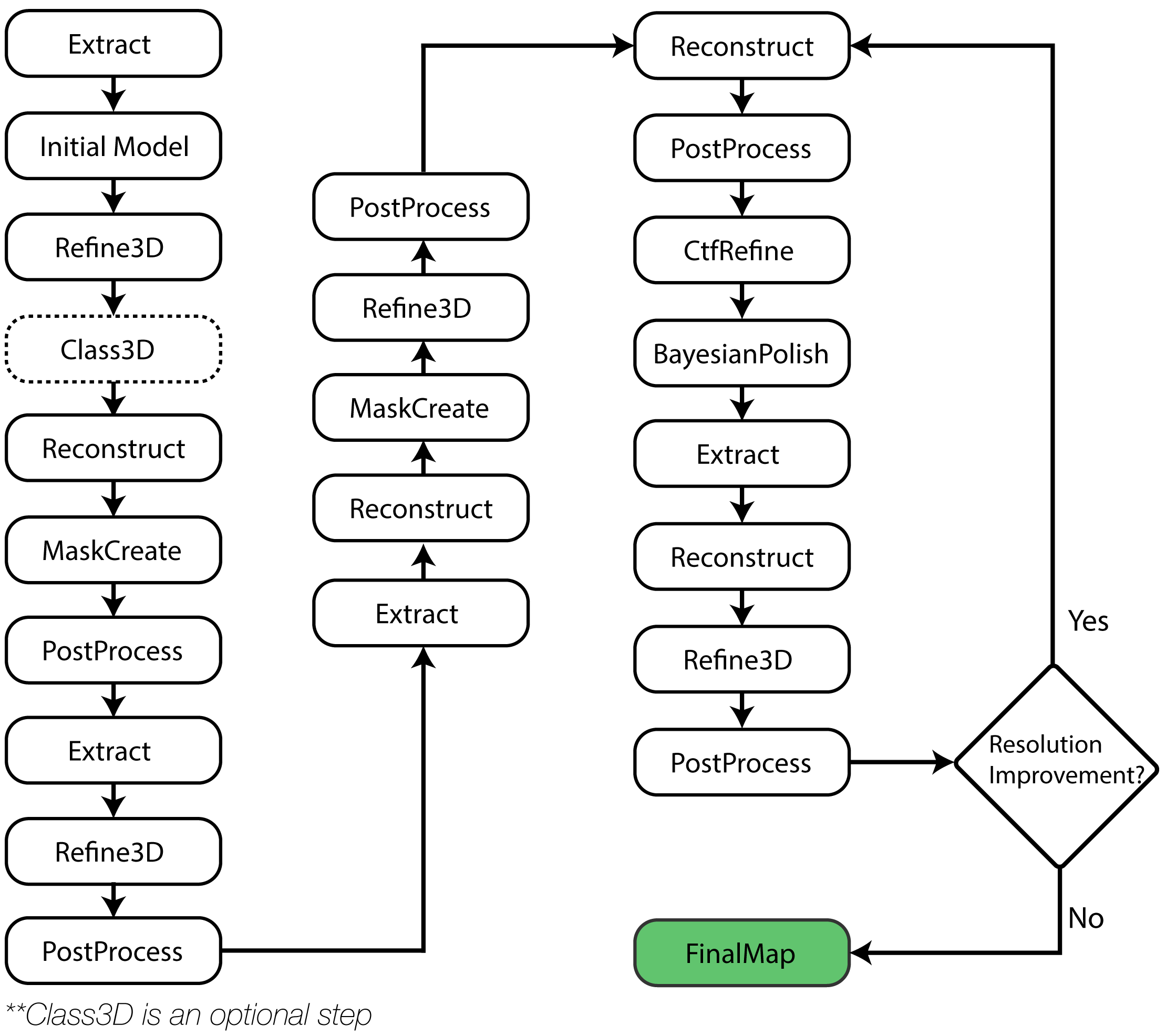
py2rely pipelines sta
At each resolution level, the pipeline:
- Extracts particles at the appropriate binning
- Refines orientations and shifts
- Reconstructs the average
- Creates a mask around the particle
- Post-processes to estimate resolution
To run on a SLURM cluster, add --submitit True; each Relion step is then submitted via Submitit. Set up once with py2rely config for Python and Relion load commands.
📋 py2rely pipelines sta Parameters
| Parameter | Short | Description | Default |
|---|---|---|---|
--parameter |
-p |
Path to parameter JSON file | sta_parameters.json (required) |
--reference-template |
-rt |
Reference template for initial refinement (optional) | - |
--run-denovo-generation |
-dg |
Generate initial model without template | False |
--run-class3D |
Run 3D classification after refinement | False |
|
--submitit |
-s |
Submit jobs to SLURM via Submitit | False |
--num-gpus |
-ng |
GPUs per job (even number) when using Submitit | 4 |
--gpu-constraint |
-gc |
GPU type(s); multiple allowed (e.g. a100, h100) | none |
--cpu-constraint |
-cc |
"ncpus,mem_gb" per job |
4,16 |
--timeout |
-t |
Job time limit (hours) when using Submitit | 48 |
Initial Model Options
After extracting sub-tomograms, we need an initial 3D reference to start refinement. py2rely offers three strategies:
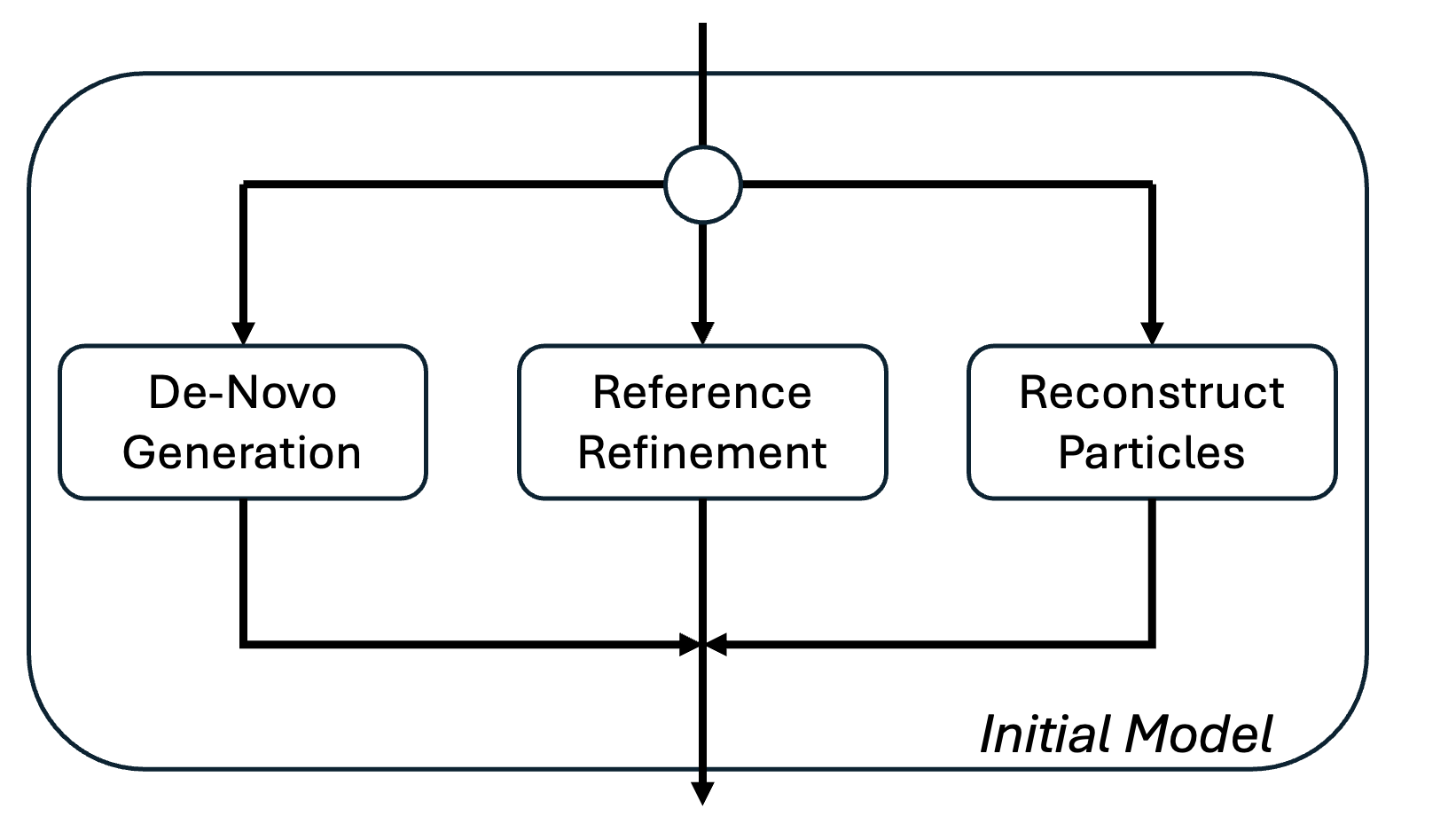
Which option should I choose?
| Scenario | Recommended Method | Why |
|---|---|---|
| Known structure available | Reference Refinement | Fastest convergence, most reliable |
| Similar structure in PDB/EMDB | Reference Refinement (low-pass filtered) | Good starting point |
| Previous STA with orientations | Reconstruct Particles | Skip initial model generation |
| Completely unknown structure | De Novo Generation | No bias, but requires good picks |
| Mixed orientations, good picks | De Novo Generation | Can work if sufficient angular coverage |
First, let's generate a template with py2rely. We can use any template that's available (e.g. EMDB) and downsample it to the resolution at the first binning factor.
py2rely prepare template \
    -i ribosome_3883.map -o reference.mrc \
    -ivs 0.83 -ovs 8.3 -lp 50 -b 64
📋
py2rely prepare template Parameters
| Parameter | Short | Description | Default |
|---|---|---|---|
--input |
-i |
Input MRC density map file | required |
--output |
-o |
Output path (.mrc) | template_{stem}_{voxel}A.mrc |
--input-voxel-size |
-ivs |
Voxel size of input map (Å) | from MRC header |
--output-voxel-size |
-ovs |
Target voxel size (Å) - should match tomograms | required |
--center |
-c |
Center density by center of mass before filtering | False |
--low-pass |
-lp |
Gaussian low-pass filter resolution (Å) | 2 × output voxel size |
--box-size |
-b |
Final template box size (voxels) | downsampled size |
--invert |
Multiply template by -1 | False |
|
--mirror |
-m |
Mirror template along first axis | False |
--log |
Logging level | 20 (info) |
In the case that the protein has symmetry, we also need to align the template with relion.
# Align to Symmetric Axis
relion_align_symmetry \
    --i reference.mrc \
    --o reference.mrc \
    --sym D2
Now that we have a template that's at the correct resolution and orientation, we can run the STA pipeline!
py2rely pipelines sta \
    --parameter sta_parameters.json \
    --reference-template reference.mrc
Common Pitfalls
When generating the template with py2rely prepare template, be sure that the box-size and voxel size are the equivalent resolution as the sub-tomograms at the first binning factor. If not, Relion will spit out an error at the first Refine3D step.
We can generate our orientations completely de-novo without the need of relying on a template.
py2rely pipelines sta \
    --parameter sta_parameters.json \
    --run-denovo-generation True
If we have the orientations already available, we can directly reconstruct our particle and use that reconstruction as our reference.
py2rely pipelines sta \
    --parameter sta_parameters.json
Auto-Class3D
In cases where users would like to rely on classification to improve the particle quality, users can use Class3D with a given number of classes and the best class will be automatically selected for the downstream processing.
After initial refinement at a coarse resolution, you can optionally run 3D classification to separate good particles from bad picks or identify different conformational states.
Why use classification?
3D classification helps with:
- 🧹 Removing junk particles - False positives from automated picking
- 🔀 Separating conformations - Multiple structural states in your sample
- ✨ Improving resolution - Focus refinement on homogeneous particles
- 🎯 Identifying your target - Distinguish protein of interest from contaminants
Run Class3D by setting --run-class3D True when starting the STA pipeline. The number of classes is set in py2rely prepare relion5-parameters with the --nclasses flag. You can let py2rely pick the best class automatically or stop after classification and choose classes yourself with py2rely routines select.
Automatic class selection (pipeline continues without stopping):
py2rely pipelines sta \
    --parameter sta_parameters.json \
    --reference-template reference.mrc \
    --run-class3D True \
    --class-selection auto
Auto-Class Selection
Auto class selection only works when two classes are used in Class3D. For more than two classes, use --class-selection manual so the pipeline stops after the Class3D job.
Then use py2rely routines select to pick which classes to keep and combine their particles into a single STAR file. To keep particles from more than one class, pass a comma-separated list to --classes (e.g. --classes 1,2,3).
📋 py2rely routines select Parameters
| Parameter | Short | Description | Default |
|---|---|---|---|
--particles |
-p |
Path to particles StarFile | required |
--classes |
-c |
Comma-separated 1-based class numbers to keep (e.g. 1,3,5) |
required |
--output |
-o |
Output path for the selected particles.star. If omitted, runs via the RELION pipeliner and appends a Select job to the project history |
None |
--output vs. omitting it
These two modes are not interchangeable:
- Omit
--output(recommended when continuing thepy2rely pipelines stapipeline): the selection runs as a tracked RELION pipeliner job, written into the project's job history at the location the pipeline expects. Re-runningpy2rely pipelines stadetects this completed Select job and automatically continues into refinement with the filtered particles. - Pass
--output <path>: the particles are filtered locally and written straight to<path>. No pipeliner job is created or recorded in the job history, sopy2rely pipelines stawill not recognize the selection as done and will exit again asking for manual selection. Use this mode only when you want a standalone filtered STAR file (e.g. for inspection or an external workflow), not when you intend to resume the pipeline.
Example (resume the pipeline)
py2rely routines select \
    --particles Class3D/job005/run_it025_data.star \
    --classes 1,2,3
Example (standalone STAR file)
py2rely routines select \
    --particles Class3D/job005/run_it025_data.star \
    --classes 1,2,3 \
    --output selected_particles.star
Example: Complete Workflow
Here's the commands after the tilt series and particles starfiles are generated:
# 2. Generate parameters
py2rely prepare relion5-parameters \
    -ts input/tiltSeries/aligned_tilt_series.star \
    -p input/24jan01_virus_like_particle.star \
    -ps 1.54 -s I2 \
    -pd 290 -bl 4,2,1

# 3. Create Template and Align
py2rely prepare template \
    -i VLP_emd_41917.map -o reference.mrc \
    -ivs 0.83 -ovs 6.16 -lp 50 -b 84

relion_align_symmetry \
    --i reference.mrc \
    --o reference.mrc \
    --sym I2

# 3. Run pipeline
py2rely pipelines sta \
    --parameter sta_parameters.json \
    --reference-template initial.mrc

# 4. Export the processed particles back to copick
py2rely export star2copick \
    --particles Refine3D/job024/run_data.star \
    --configs config.json \
    --sessions 24mar08a \
    --particle-name virus-like-particle \
    --export-user-id relion \
    --export-session-id 1
Next Steps
- Learn about Running STA Pipelines on HPC for efficient utilization of compute resources.
- Learn about 2D slab classification for alternative workflows
- Explore data import options for different data sources
- Check the API reference for advanced usage