How Idetik Works
This guide describes Idetik's architecture at a high level. It is for anyone who wants to extend the library or reason about how it loads data and uses memory. It is not a reference: the API Reference has the exact signatures.
Objects and Ownership
Every Idetik application is a small tree of objects. At the root is the Idetik runtime. It owns the canvas, the renderer, the chunk manager that streams data for it, and any number of viewports. A Viewport owns a camera, optional camera controls, an element that defines its area, and an ordered stack of layers. A Layer manages a collection of renderable objects to be drawn by the renderer.
A source stands outside the tree. The application creates it and layers read from it.
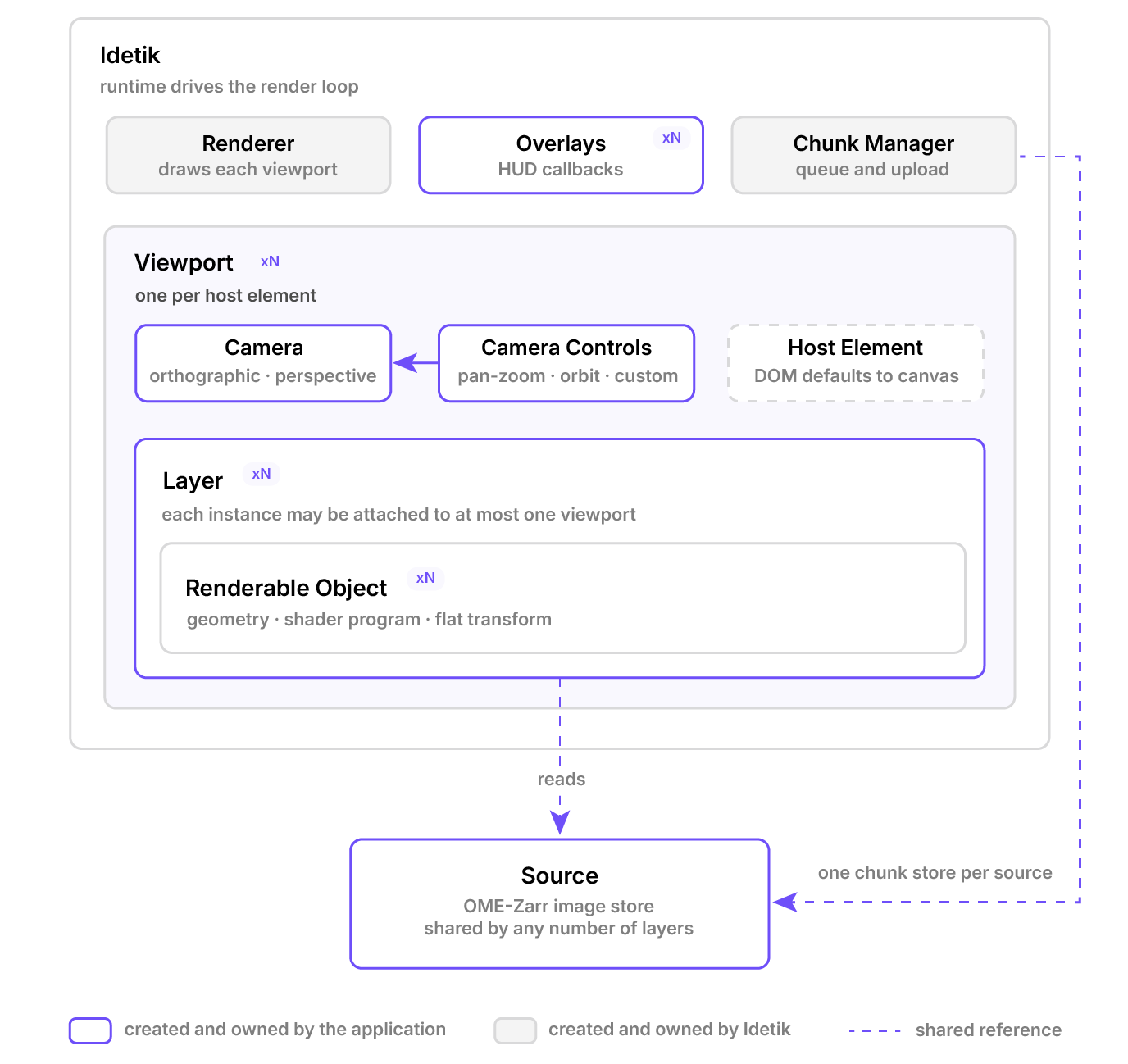
Nesting is ownership. The runtime creates the renderer and the chunk manager. The application creates everything else and hands it in. A source is shared by reference.
Two objects are never constructed by the application. The renderer and the chunk manager are created by the runtime and reached only through it. Everything else is built by the application and handed in. That is what makes the library composable: a camera works with any controls, a source feeds any layer, and a layer draws in any viewport.
The tree is not a scene graph. Each renderable object carries one transform expressed directly in world coordinates and nothing inherits a transform from a parent. Nesting here means lifetime and update order, not spatial containment.
Idetik has no user interface and holds no application state. The application creates its objects and passes them to Idetik by reference. It changes them and Idetik reads them on the next frame. There is no store to dispatch to and no event to emit. This one principle explains much of what follows.
One Coordinate System
Everything in Idetik is in world units. An OME-Zarr image declares a scale and a translation for each axis at each resolution level, and Idetik uses them to place every chunk in physical space, typically micrometers.
Idetik applies the scale and translation as given and does not interpret the axis unit. The unit is passed through in the source's dimensions, but no conversion takes place. This only matters when sources disagree: an image whose axes are in Å overlaid with labels in nm will draw at the wrong relative size.
The camera frames a region of that space and SliceCoordinates select data in it: a z of 278 means 278 µm into the stack no matter which resolution level is drawn or how the array is chunked. The channel coordinate is the exception. A channel has no position in space, so c takes channel indices rather than a world value.
The same placement makes slicing cheap. Idetik uploads every chunk to the GPU as a small 3D texture, even for 2D layers. A 2D layer draws each chunk as a quad at the chunk's world position, and the shader reads the texture at the fragment's world position. Moving z within a chunk moves the quad so the shader samples a different plane of the same texture. Nothing is fetched or uploaded until the slice leaves the chunk.
The Frame
start begins a render loop driven by requestAnimationFrame. The loop never idles. There is no dirty flag and nothing tells Idetik that a camera moved or a slice coordinate changed. Each frame reads the current state of every object and draws it.
This approach yields a runtime with no invalidation logic and no missed updates but the cost is real: the loop draws every frame even when nothing has changed. Rendering only on change is a candidate for a future release.
A frame proceeds in a fixed order. Each viewport, in order, integrates its camera controls, updates its layers, and draws them. A layer's update is where streaming decisions are made: it inspects the camera, decides which chunks it needs at which resolution, and rebuilds its renderable objects from the chunks that have already arrived.
Once every viewport has drawn, the chunk manager runs. It gathers what all the layers asked for, admits requests against the memory budget, hands them to the loading queue, uploads a few finished chunks to the GPU, and evicts if it must. The overlays run last.
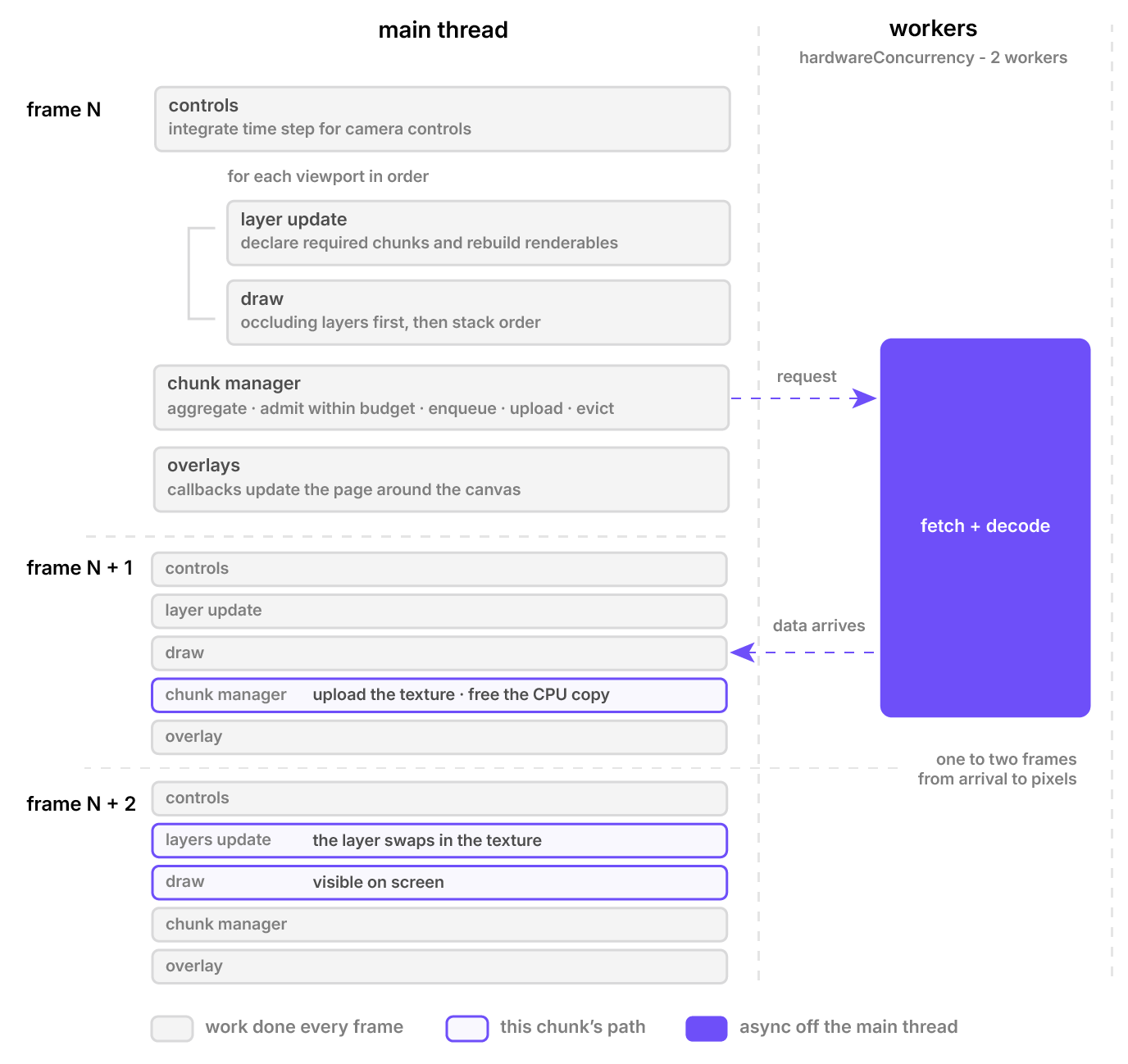
One frame, then the path of a single chunk. Layers request while drawing, the manager acts after every viewport has drawn, and a chunk on screen in frame N+2 was requested in frame N.
The ordering has a consequence the diagram makes visible. Layers declare their needs while drawing, and the manager acts on the aggregate afterwards. A chunk requested in one frame is fetched and decoded off the main thread, arrives during a later frame, is uploaded at the end of that frame, and is ready to be drawn in the frame after that.
Data is on screen one to two frames after it arrives. The delay is invisible in practice, and the arrangement keeps every frame's work bounded: uploads per frame are capped, so a burst of arriving chunks spreads over several frames instead of stalling one.
Viewports and Input
A viewport is a region of the canvas that renders a stack of layers through a camera. Its region is defined by an HTML element. By default that element is the canvas itself so a single viewport fills it. To place several views on one canvas, the application positions the canvas behind a set of ordinary elements and gives each viewport one of them.
The renderer reads each element's layout box and restricts drawing to it. Viewports can therefore be laid out with CSS grid or flexbox like any other content, and every viewport shares one rendering context and one set of GPU resources.
const idetik = new Idetik({
  canvas: document.querySelector<HTMLCanvasElement>('#viewer'),
  viewports: [
    {
      element: document.querySelector<HTMLElement>('#top'),
      camera: topCamera,
      layers: [topSlice],
    },
    {
      element: document.querySelector<HTMLElement>('#side'),
      camera: sideCamera,
      layers: [sideSlice],
    },
  ],
});
The element also routes input. Each viewport listens for pointer and wheel events on its own element so the browser decides which viewport a pointer is over. A layer may stop propagation to keep an event from the controls, for instance, to drag a handle without panning the view. Controls see the event last.
Cameras are plain objects and controls are an interface. PanZoomControls and OrbitControls write to the camera's transform directly, and the next frame draws the result. Any object that implements CameraControls can drive a camera.
Viewports and layers can be added and removed while the runtime is running. A layer belongs to one viewport at a time and adding it to a second throws.
Synchronizing views follows from the plain-object model. Two layers constructed with the same slice coordinate object show the same time point and move together when it changes. Channel appearance is scoped to each layer, so the application must call setChannelProps() on each layer to recolor several views together. Layers on the same source share every chunk the source loads, whichever viewport they draw in.
Layers and Renderables
A layer decides what to draw and how to handle input. Its LayerState controls whether the renderer draws it. The renderer calls update() every frame, but skips drawing until the state is ready. Built-in streaming layers switch to ready on their first update after attachment, whether or not any chunks have arrived. Applications can subscribe to state changes, but ready is not a signal that image data is available.
Every layer carries three presentation settings. opacity scales its output. blendMode chooses how its pixels combine with what is already drawn and also how objects within the layer combine with each other.
occludes declares whether the layer hides what is behind it. Occluding layers draw first in a depth pass followed by a color pass, wherever they sit in the stack. Non-occluding layers draw afterwards in stack order and blend over them. When not set occludes is inferred from the blend mode at construction. The image layer sets it explicitly because it blends its channels additively within the layer yet should read as solid to the layers above it.
A renderable object is a geometry, a shader program, textures, and one transform. A new layer type is a subclass of Layer that owns some: it registers them with addObject, rebuilds them in update() when its data changes, and sets its state to ready. The built-in renderables are exported for this, so a layer that draws points or lines needs no shader work. The built-in layers create theirs from the chunks they receive.
| Layer | Draws | Per frame |
|---|---|---|
ImageLayer | One 2D slice of a multi-channel image | Streams the chunks under the view at a matched resolution. One quad per chunk per channel. |
LabelLayer | One 2D slice of an integer label image, colorized | As the image layer, for a single channel. Adds picking and highlighting. |
VolumeLayer | A ray-marched 3D volume | One box per spatial chunk carrying up to four channels, drawn back to front. |
The image layer composites channels inside itself. Each channel of each chunk is its own renderable tinted with the channel's color and stretched by its contrast limits, and the layer's additive blend sums them. Hiding a channel removes its renderables.
The volume layer composites the other way around: all channels of a chunk are sampled in one shader as a ray steps through the box. The volume shader also reads the depth that occluding layers have written, so a volume can surround a slice and stop at it.
When a layer registers a renderable it may name a coverage group. Objects in the same group draw each pixel at most once: the first object to cover a pixel claims it and later objects in the group leave it alone. This is what lets a layer overlap chunks from several resolution levels without blending them twice. The next section shows why that matters.
Streaming Chunks
A source describes an image and knows how to load pieces of it. OmeZarrImageSource reads the metadata of a multiscale OME-Zarr group when it is created and exposes, for each axis and each resolution level, the size, the chunk size, and the scale and translation in world units. Nothing else is fetched until a layer asks.
In each frame, a streaming layer asks for the chunks under its view. It picks the resolution level whose elements are closest to one screen pixel at the current zoom, then requests the chunks at that level that intersect the view, padded by the policy's prefetch distance and ranked by category and by distance from the center of the view.
Alongside that level it always requests one coarse level as a backdrop. The backdrop ranks first, so the view is covered quickly at low resolution and refined as finer chunks land. When the slice changes, the layer keeps showing the old one until the new backdrop has fully arrived, so scrubbing through time shows whole frames rather than half-loaded ones.
All requests meet in the chunk manager. It keeps one store of chunks per source shared by every layer and viewport that reads the source, so a chunk visible in two views is loaded once and kept as long as either needs it. When several layers rank the same chunk the most urgent ranking wins.
Requests are served most urgent first, a bounded number at a time, and a request is cancelled when its chunk drops out of every view. Fetching and decoding happen on a pool of workers which read the compressed chunk and transfer the result back without a copy.
The manager uploads chunks to the GPU as 3D textures as soon as they load, a few per frame so a burst of arrivals never stalls, and frees the CPU copy at once.
The prefetch distances, the ordering of priority categories, and the range of levels are the three knobs of a loading policy. Loading Policies describes presets and how to build them.
The Memory Budget
Every chunk resident on the GPU counts against one budget, set by memoryLimitMB and shared by all viewports of a runtime. The default is two gigabytes. The manager admits a request only if the chunk will fit, evicting less important resident chunks to make room if it must. A chunk visible in any view is never evicted.
Chunks that fall out of view are not freed. Their textures stay resident, marked as released, so panning back or scrubbing to a recent time point is instant. Only when a new request needs the space does the manager evict, taking the least important chunk first and the longest released among equals.
As a result memoryStats reports GPU usage that climbs toward the budget and stays there. That is the cache working, not a leak. The budget can be changed at any time with setMemoryLimitMB. chunkQueueStats reports how many requests are waiting and in flight, which is the number to watch when tuning a policy or judging a connection.
The budget counts only the textures Idetik uploads. The canvas, other pages, and other applications draw from the same graphics memory, and the browser offers no way to read its size, so the limit has to be chosen for the devices an application targets. The default suits a discrete GPU or a recent laptop. Set it lower for devices with little graphics memory to spare, and raise it only when the hardware is known.
Conclusion
An Idetik application is a tree of plain objects the application owns and a loop that reads them every frame. Viewports divide a canvas and route its input. Layers decide what to draw and ask for the chunks under the view. One manager streams those chunks for every layer at once under a single budget. Whatever the application needs to observe, it reads. Whatever it needs to change, it writes.
With this picture, the examples in the repository read as variations on one pattern, and a viewer of your own is a matter of choosing which objects to build.